OUR OWN SeaClear compatible AIS receiver for £96.50 ? (+Postage)

If you use a PC based navigation system on your boat, you may be interested to know that you can very simply and cheaply add AIS capability.

If you're not sure what AIS is find out HERE, if you don't use a PC for navigation but are still interested in AIS.. Click here

Still here?  Good.

Here at VisitMyHarbour we've looked around for a suitable AIS receiver that can make full use of our very popular "Charts for SeaClear" navigation system for laptops.  There are basically two contenders that will hook up with your laptop and interface with many navigation programs.

The offering from NASA Marine is good value at around £130, but will need a separate USB cable and needs to be wired into the boat with a dedicated 12v supply.

The "In Line" AIS receiver


Approx real size, comes with USB ext lead and BNC adaptor for aerial cable

Some Benefits:
  • Easy to interface with our SeaClear charts, USB one end, connect VHF aerial the other
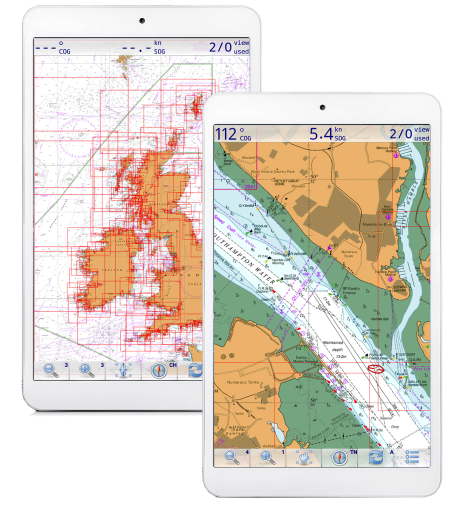
  • Monitor shipping in the vicinity, inc. course, speed, name, callsign... all laid out on your chart
  • Great safety aid in poor visibility and darkness
  • Calculate risk of collision in real time.
  • Positive ID for VHF contact with ship
The "In Line AIS" receiver at £96.50, (plus £2.50 P&P) needs no permanent fixing in the boat, needs no 12v supply, and plugs  into your laptop's USB socket (directly or with extension USB cable).  Just like the NASA unit, it needs it's own dedicated VHF antenna, plus VHF co-ax cable to connect.  It's bascially a USB cable, leading to a small USB device (about the size of a flash drive), with a VHF connector on the other end.  Your VHF cable from the antenna can connect with the device directly via this connector.

Alternatively you can add a short "patch" lead from the device terminating in an SMA or BNC connector (to suit your VHF cable).  Adding a patch lead will make this device truly "In Line", portable between boats, and also protects the small socket on the device from the strain of repeated connections and disconnections.  It also opens the possibility of encapsulating the whole small unit with the two cables emerging either end. This would waterproof it completely.  As it comes it's not waterproof and neither is the NASA unit.

For a more permanent fixing the unit can be placed in the dry, out of the way and (more or less) permanently connected to the VHF aerial cable, in which case a patch lead won't be needed at all.

The "In Line" AIS receiver (like the NASA and many other cheaper units) only receives on one AIS channel (of the two used) at a time. It can be preset to scan the two channels, or to simply stay on one channel.  The designers preference is to have it receiving on one channel constantly, to avoid "out of synch" issues with shipping. To understand why, it's best to read the primer article on AIS Click Here.


UK Price £96.50 plus £2.50 P&P (Always sent recorded delivery, normally same day).  30 day no quibble money back guarantee, and a 1 year warranty


Pay with PayPal, or Debit/Credit cards

The "In Line" AIS receiver is compatible with all flavours of Windows from XP to Windows 7. Although compatible with Vista generally, it is not compatible with 64 bit versions of Vista. It comes with a 21 page booklet that shows step by step how to install the drivers and connect to your laptop.
It also has a USB extension lead and an BNC adaptor for your aerial lead.


The In-Line AIS receiver £96.50... quick summary:
  • Not expensive, in fact you won't get cheaper.
  • Small, light and portable
  • Allows a VHF aerial to connect to your navigation PC and decode AIS signals.
  • Works with SeaClear and many other Windows navigation programs
  • Needs no separate power supply, plug into laptop one end and VHF aerial cable the other, that's it.
  • Won't flatten your ships batteries (Unlike radar on a sailboat)
  • Portability makes it suitable for ship-watchers to use from the shore. (needs VHF antenna)
  • Normally sent same day by recorded delivery
  • 30 day no quibble money back guarantee, 1 year warranty
  • Phone tech backup if needed, 5 days a week
  • The perfect companion for our "Charts for SeaClear" Navigation products


What other things are needed to use this ? Windows laptop with a preloaded navigation program (like our "Charts for SeaClear" from £29.50). A VHF aerial (can't use the same aerial as your VHF transmitter) plus aerial cable.


Want to speak to someone about this ?  Call VisitMyHarbour on 01983 567866    Mon-Fri 10-6, we're here in Ryde on the sunny Isle of Wight !


VHF aerial installation considerations:

For the installation of the VHF aerial, it is recommended to place it so that it could also be used as an emergency VHF transmitter aerial, with it's cabling terminating in a plug that will go straight into your VHF radio in an emergency (normally a BNC plug).  Try and arrange it so you could unplug the AIS unit and then plug that aerial cable straight into your VHF transmitter.

On a sailing yacht the stern rail or stern gantry (if present) would be a good spot for the emergency/AIS antenna (in case of dismasting).  In all cases the AIS aerial needs to be more than 2m away from any transmitting aerial, and at least 1m away from the device itself.  The NASA unit is the same in these respects.

When siting the aerial for AIS use, the same siting considerations as the VHF transmitter aerial do not really apply.  For transmitting you need the aerial as high as possible, to get max "line of sight" range for your transmissions (masthead).  For AIS use, with shipping generally having their AIS transmitting antenna 20m or more above sea level, your receiving antenna can be much lower. You will still receive ship AIS transmissions from 12-15 miles all round, and often more.  This is more than sufficient for collision avoidance, and about the same as the useful range of a small craft radar set.


Interfacing the AIS with SeaClear and other compatible chartplotting programs

Buyers of our "Charts for SeaClear" nav package on DVD or USB will probably already have some experience of connecting a GPS set or dongle to the SeaClear program.  Connecting this AIS is very similar indeed.  First a driver is installed for the device (supplied on a CD).  It's then plugged into a USB socket with it's extension lead. (Tip... always use the same dedicated socket for this, and likewise always use a dedicated socket for your GPS... saves com port issues).

Once plugged in, Windows will find it and install.  Now find out which Com port it's using.  In XP right click "My Computer" , click "Manage", then select" Device Manager"  now toggle the - to +  beside "Ports COM and LPT" ...  you will see it listed, make a note of the number.  With Windows 7, go "Start" then "Devices and Printers"  ... where you will find it listed with Com port number.

Next SeaClear is fired up, and using "Tools" >>> "Properties" >> select COMM.  Your GPS will be using one of the available 3 ports, select another, then enter the AIS com port number
(as discovered above) .  Select a Baud (BPS) rate of 38,400.  That's it.

While you are in the "Properties" box, it may be worth hitting the "Instruments" tab, and choosing a bright target colour, and a huge size icon for AIS shipping... to start with.

Time for some testing !  If on the boat and you haven't yet rigged your dedicated AIS antenna (VHF aerial), you could at this stage try unplugging your main VHF aerial from your transmitter, and plugging it into the device.  There are dire warnings in the handbook about using any kind of force on the tiny aerial socket emerging from the AIS dongle...take notice of them.  It's by far the best plan to make an extension patch lead if you're going to be doing lots of plugging and unplugging.

Providing you're near shipping, SeaClear is set up and running with GPS position...AND the AIS dongle is set up with a VHF aerial... this is what you're likely to see within a minute:


This is an AIS target heading for Ryde Pier, heading in the direction of the line in front of it.


And here is the info it's giving out (in fact it's the Fast Cat ferry, hidden under the grey box), it's slowing down, 11.8 knts, for berthing on the pier.

Depending on your location, you should now be receiving AIS information, and see the shipping around you.


Some real life results:

The above screenshots were taken on the Panasonic Toughbook from down at the seafront.  The aerial was simply a short rubber helicoil aerial unit quickly removed from a hand held VHF, and plugged directly into the AIS dongle.

Even in our office half a mile away and indoors, using this same antenna, we are picking up shipping over 2 miles away.  We can watch the big ships coming in and out of the Eastern Solent and gliding past Ryde.  This bodes well... with a decent antenna, properly mounted on the boat (and away from the AIS dongle as recommended) the range should be 12 mile plus.


Conclusion

AIS could be a real safety aid if used responsibly at sea, esp. in poor visibility.  There's no excuse for not keeping a good lookout.. for boats, very small ships, buoyage, debris, etc. etc.  The "North up" radar like display of AIS shipping will allow range rings and bearing lines to be drawn on your plotter (SeaClear).  Ships maintaining a constant bearing while moving closer into range mean you are on a collision course.  The ability to know the ships  course, speed, and rate of turn, will enable the prudent mariner to judge whether the ship is going to give way (if required by the col-regs).  Quite often if they have to give way, they just tweak their course enough to go behind you.  Without the AIS it can be very hard to judge if in fact they are doing this... or just thundering along oblivious and uncaring.  If clarification is needed, it's easy to call the ship...you will know it's name and callsign.


It should be remembered that ships haven't "got it in" for yachts and small craft.  They are equally at home ramming into eachother !   And that's another benefit of the AIS.  You can judge what other shipping around could be having an influence on the decisions of that monster looming towards you, as you do the maritime dance across the shipping lanes.


Overall we really like AIS, and recommend getting it fitted on your boat if you mix it with ships.  Radar it is not, but in it's own right, a real aid to safety at sea...


UK Price £96.50 plus £2.50 P&P (Always sent recorded delivery,normally same day).  30 day no quibble money back guarantee, and a 1 year warranty


You won't get AIS for less. Pay with PayPal, Credit or Debit cards.


The "In Line" AIS receiver is compatible with all flavours of Windows from XP to Windows 7. Although compatible with Vista generally, it is not compatible with 64 bit versions of Vista. It comes with a 21 page booklet that shows step by step how to install the drivers and connect to your laptop. It also has a USB extension lead and an BNC adaptor for your aerial lead.

Want to speak to someone about this ?  Call VisitMyHarbour on 01983 567866    Mon-Fri 10-6, we're here in Ryde on the sunny Isle of Wight !


Reasons to buy this from VisitMyHarbour:


We already make very popular UK/Irish waters chart packages using the well established SeaClear chart plotting software, the "In Line" AIS works perfectly with these.  We've examined and tested it, and we like the simplicity and price.  If you don't already know VisitMyHarbour, we can assure you we take customer satisfaction very seriously.  Our innovative pilotage website has been running over 2 years and getting busier all the time.  We have many hundereds of paid members using out online charting services, and have sold hundreds of our own "Charts for SeaClear" DVD and USB products, that absolutely smash the price barriers for electronic charts.  VisitMyHarbour are approved by Trading Standards, and have acheived the "Buy with confidence" logo.

See some genuine customer comments:


"Good Day Maury.  

Arrived in good order. Very impressed with the system and no problem running with my Garmin GPS and also with my cheep and cheer full usb gps.

Many thanks for a great product with the facility to obtain updates in the future as required.

Best Regards"


"Hi all at VMH,  All set up and running ... many thanks

Regards

R"


"Wow,  That's what I call a fast service! Thanks very much,..."


"Thanks very much for your very prompt and considered reply.....it's that 'John Lewis' standard of customer service again that you're becoming known for."


"...– bless you – especially for your honesty – so many people these days attempt to flannel their way out of things it is refreshing to get an “Oops, sorry” reply.  And of course – me being me I assumed that I was being dense!!"


P.S.

When you use VisitMyHarbour.com, you are not enriching the coffers of some moneygrubbing PLC.

You're not accessing illegal, ripped off, hacked and cracked C-Map charts. Nor are you dealing with a shark of a broker in a smart blazer, and half a dozen dodgy companies he's laundering your hard earned money through. You are dealing with genuine hands on boating enthuiasts, who work hard and love the sea.  We don't hide behind limited companies and are approved by the Trading Standards "Buy with Confidence" scheme.

Paid up member, customer or not, we endeavour to answer all your enquiries and help in any way we can.  We truly do believe in the brotherhood of the sea, and aim to work in a spirit of co-operation.  We are in the ongoing process of gathering and building up the best and most up to date pilotage information available for UK waters, and with your support we'll accomplish it.


Best Regards,


  Mackenzie       &       Bryant

© visitMyHarbour.com | website design created by Black Culm Ltd