Free UK Harbour information with tides, charts and...For Nav products

|
|
|
|
|
 |
|
|
|


Buy download or update a "For Nav" product ? Here they are: Android Windows Cross Platform (inc RasPi)
 UK and other European chart coverage
Research: Impartial and original information... free to use
314 Harbours: Each harbour (NOT JUST marinas) has full sailing directions, free charts, and photo galleries. All mooring options are covered, including: prices, local facilities, provisioning, launching places, pubs and dining. Plus 7 day weather and 2023 tide tables. Interactivity Logged in visitors can leave comments and information.
Access via the Regions menu on the left,
Or Click here to browse through all harbours
Or: Access them via VMH lite A fresh map driven mobile friendly site. Harbours will appear as clickable markers. Works great on BIG screens too.
Our hard won harbour research work is freely available for all to view on both sites. Charts and tidal information that we have to pay to license is DEMO marked or size restricted for casual users,
Even... if you know nothing about boats, there's some great articles and videos to entertain you.. Have a look ! Why not spend half an hour rummaging about. Don't be confused about what we do on this site: Explain to me Now .
Plan: Gather the navigational info needed for passage planning.
"UK law requires every skipper/navigator to prepare a suitable passage plan prior to putting to sea. From start to completion (dock to dock), the voyage of each vessel must be described. This must include leaving the mooring and harbour area (pilotage), the main part of the journey (passage plan) and the approach and entrance/docking at the destination port (pilotage). These events are required to be documented for all vessels whether a small cruising yacht sailed by a leisure sailor, or a massive commercial freight carrier. SOLAS (International Convention for the safety of life at sea) requires a passage plan to be made even if it is only for a short leisure sail. And it needs to be written down. Failure to comply can lead to errors and navigational accidents. Even the use of passage planning software requires the plan to be written down prior to the proposed sea passage." http://www.passage- planning.co.uk/

And THIS is where full membership of VisitMyHarbour really pays off. All the info you will need to prepare a proper passage plan is here for UK/Ireland. On this site or on the VMH-Lite site. A one stop shop to gather all the planning bits needed in advance.
Prepare your written passage plans using the vast collection of tidal and chart info at your disposal in the members area, combined with our harbour coverage in the free part of the sites.... Use the harbour coverage to prepare your written pilotage plans, draw sketch charts, note buoyage and light signatures. Using our unique VisiCharts overlay, you could draw your coming sea passage on the latest charts using standard Google Earth tools, And make notes about tidal gateways and timings. Lat/Lons can be extracted. All in all, so much planning can be done in the comfort of your home in front of a big screen.
Click or tap the buttons below to see this info on the map driven VMH-Lite site
 .
.

Click HERE for Tidal info on this site. And HERE for some "Paper Chart" samples on this site.
Enjoy what you see on this website ? Join our other 8609 paid members (Sept 2024), including some very well known sailing "names".. A one off payment of £25 gets you ongoing membership of VMH Classic (this site). No more to pay. Access a whole trove of online research material, charts, plus stunning seamless zoomable 2024 Satellite/Chart image overlays. Download our own Harbour coverage as PDFs for offline use.
Quick peek at VisiCharts:
Memberships: Join us NOW
.Or subscribe to VMH-Lite for £7.99 per year.
Navigate: Made your plans ? Prepare routes in one of our GPS chartplotting systems...
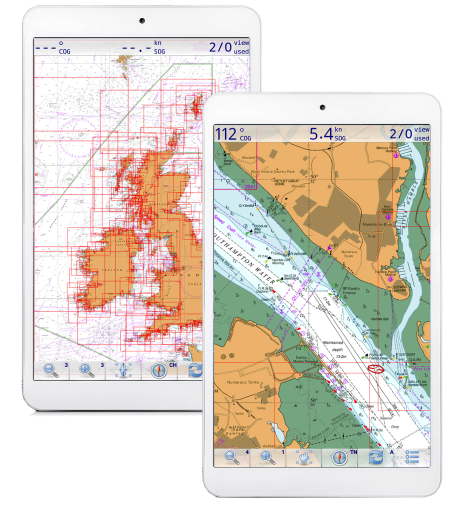
Beautiful raster charts. A perfect foil for the vector charts in your marine chartplotter. Buy and keep (download or USB), NO SUBSCRIPTION. We concentrate on making charts available for existing GPS navigation softwares... running on phones, tablets and laptops you probably already have.
Our Android charts that run in "Marine Navigator" app are the best selling product we've EVER made from £13.60 for whole UK and Ireland coverage. 2026 charts now available.
UK and other European chart coverage
Turn Key Android Chartplotters
Unbox them on the boat, and just turn them on !
Android: Marine Navigator app and Charts
Turn your Android tablet/phone into self contained GPS chart plotter
Unified Charts (compatible with OpenCPN on Windows)
Windows (choice of 4 nav programs) and Android (Marine Navigator) capability. NOT for RasPi, Mac, Linux
qtVlm- the new Nav, Weather and Simulator program
Fully Cross Platform navigation. RasPi, Mac, Linux, Windows, iPad, Android
VisitMyHarbour.com since 2009. All charts used online and in products are derived from Official British or SHOM raster charts and licensed by the UKHO/SHOM. We recommend always using Admiralty paper charts in conjunction with any electronic navigation systems.
Featured Harbour show all

Poole Harbour, Approach and Entrance, Anchorages at Studland Bay and South Deep
Channel, WestThe Sandbanks Yacht Company sponsor this page...
Poole itself is a huge natural harbour, much of it shallow with several....... ... read more
 Read more